
You can permanently delete an individual contact's personal data from Alto using the Delete action on their contact record, for example when the contact makes a right to erasure request (also known as the right to be forgotten) under GDPR.
Not what you're looking for? Did you mean...
Deleting lots of contacts at once? See Bulk deletion: Overview, validation rules & planning.
Deleting a contact can't be undone, so check first whether you need to keep their data. The ICO's guidance on the right to erasure explains your obligations, including when you can refuse a request, for example when you need to keep data to meet legal or regulatory requirements.
Warning
There is NO way to reverse this action, and deleting an individual contact has no 7-day rollback window. Make sure you want to delete the contact record before you proceed. As your software provider, we can't take responsibility for data removed in error.
Permissions for deleting a contact
Only users with the DeletePersonData permission can use the Delete action, so you control who can remove personal data. Users with the GroupAdministrator role have this permission automatically. To give it to other users:
- Click Tools (the cog) on the main navigation bar
- In the dropdown menu, click Templates and admin
- On the side menu, under System Tools, click System Administration
- Click Group Roles
- Click Edit next to the relevant group
- Give Full access to the permission called DeletePersonData
- Select the appropriate user(s)
- Click Save
What can stop a contact from being deleted?
Before a contact is deleted, Alto checks for accounting transactions you may need to keep for HMRC, based on your Accounting Retention Period (in years) setting. This setting is in Tools (the cog) > Templates and admin > System Administration > Group Settings, and applies to both individual and bulk deletion.
- If it's set to 0, no check is made for accounting transactions. You'll be warned that it's set to 0 when you select Delete, but you can still proceed
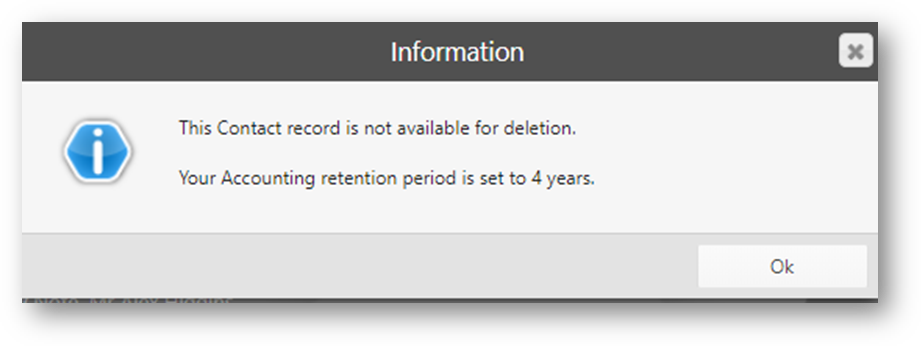
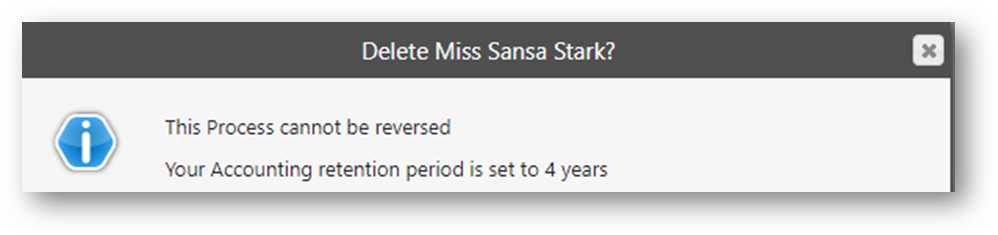
- If it's set to a number of years, Alto checks for accounting transactions within that number of years. If any are found, you're prevented from deleting the contact, and the message shows the value set. Click Ok to close the message. The contact isn't deleted
Warning
If Accounting Retention Period is set to 0 and you delete a contact who has accounting transactions, you won't be able to retrieve that data if HMRC requests it.
Deleting a contact record
Delete the contact from the Actions menu on their contact record. A warning message asks you to confirm the data doesn't need to be kept before you can proceed.
Warning
Check whether there are two people listed on the contact record before you delete it. If there are, both people will be deleted.
- Click Contacts on the main navigation bar
- Select the relevant contact from Recent & Favourite Contacts
- Alternatively, find the contact using the Search Contacts bar in the top right
- Click Actions
- In the dropdown menu, click Delete
- Read the warning message. On first viewing, there's a 10-second countdown before the Proceed button becomes available, to give you time to read the full message
- The first point, The contact information does not need to be retained for any legal requirement, covers things like Anti-Money Laundering (AML) checks or Ombudsman complaints
- Click Proceed
A confirmation message, Contact successfully deleted, appears in the top right of the screen, and the Contacts Overview screen shows the deleted record:
- You won't be able to see any information about the person
- You won't be able to use any of the action menus or buttons
- If you search for this person, they won't appear in any search results
- If the person had made an offer on a property or attended a viewing, for example, you can still locate the record from the property, but their details are anonymised so the person can't be identified
If you decide not to delete the contact
If you refuse an erasure request, for example because you need to keep the data for legal reasons, let the person know your decision (the ICO's guidance on the right to erasure explains what to tell them). You can then update their contact record so you don't contact them while you keep their data. You could:
- In the Contact top tab, remove their E-Mail address
- In the Preference Centre top tab, change all consent flags to Denied consent
- In the Contact and Position top tabs, change their Intention to Not Looking and their Position to Not Specified
- In Contact on the side menu, remove their Requirements Search Profile from matches
- In the Contact or Contact Notes top tab, add Contact Notes to record that they asked to be deleted and this was refused
Did you know...
You can also archive the contact so they're hidden from searches by default. See Archiving, finding and unarchiving a contact.
FAQs
Note
The content below is not legal advice. We've answered common questions based on what Alto allows you to do. Please consult a legal advisor on your GDPR responsibilities.
- Can I keep a contact's data for complaints, Ombudsman or AML purposes?
Yes. When you select Delete, the warning message reminds you to consider keeping the contact's data for regulatory or legislative purposes, such as the Ombudsman scheme or AML checks. If you need to keep it, don't proceed with the deletion. The ICO's guidance on the right to erasure explains when you can refuse a request.
- How do I make sure I keep accounts data that HMRC may ask for?
Use the Accounting Retention Period setting. Contacts with accounting transactions within the number of years you set can't be deleted, so you keep the information HMRC may request. See What can stop a contact from being deleted? above.
- What happens to a contact's current business if I delete them?
Before you delete a contact, check whether they have a pending or accepted offer, are a prospective or current tenant, or are selling or letting a property with you, and update that business first. Once you've deleted the contact, you won't be able to identify them as the applicant, vendor or tenant on that business.
- Can I get a deleted contact back?
No. Deleting an individual contact can't be reversed. Contacts removed using bulk deletion can be restored for 7 days - see Bulk deletion: Viewing and restoring deleted contacts (7-day rollback).
- What happens to documents stored on a contact when they're deleted?
Any attached documents, such as uploaded copies of a passport or a guarantor letter, are permanently deleted from Alto. You're responsible for deleting any copies held elsewhere. Documents created in Alto and stored on the Timeline will no longer be available to view.
-
Related Help Centre articles that you may find useful.