
If you use Alto with Property Management enabled and one of your contacts (i.e. a customer) sends in a 'Right to Erasure' request, you're able to delete their personal data that you hold in Alto by way of deleting their contact record.
Warning
- There is NO reversal of this action. You must be clear that you wish to delete the contact record before proceeding. As your software provider we can take no responsibility for data that is removed in error
To understand your customer’s ‘right to be forgotten’, we recommend using the ICO’s website. This also has information about your right (as an estate agent) to refuse a customer's right to be forgotten, for example when you need to retain data for legal/regulatory requirements.
Enabling user permissions for contact record deletion
The permission to use the Delete action will automatically be given upon deployment to anyone with the GroupAdministrator role.
To give this permission to any other user:
- Click Tools (the cog) on the main navigation bar
- In the dropdown menu, click Templates and admin
- On the side menu, under System Tools, click System Administration
- Click Group Roles
- Click Edit next to the relevant group
- Give Full access to the permission called DeletePersonData and select the appropriate user(s)
- Click Save
Deleting a contact record
Note
Before deleting a record, check to see if there are two people listed on a contact record. If there are, you'll have to delete them both
- Click Contacts on the main navigation bar
- Select the relevant contact from Recent & Favourite Contacts
- Alternatively, find the contact using the Search Contacts bar in the top right
- Click Actions
- In the dropdown menu, click Delete
- When using the Delete action, Alto will honour a setting in Tools (the cog) > Templates and admin > System Administration > Group Settings called Accounting Retention Period (in years).
When set to 0, no check will be made for accounting transactions. You will be warned that you have set this to 0 when you select the action, but you will still be able to proceed
- When using the Delete action, Alto will honour a setting in Tools (the cog) > Templates and admin > System Administration > Group Settings called Accounting Retention Period (in years).
- A warning message appears, and on first viewing, you'll have a 10 second countdown to allow you sufficient time to read the full message
- The Proceed button will be unavailable when the message is first presented. After the delay, the Proceed button will be available for use
- The first bullet point The contact information does not need to be retained for any legal requirement would include, for example, the need to conform to Anti-Money Laundering checks or Ombudsman Complaints
- Proceed to delete the contact record (steps continue after the below information)
If you hold accounting transactions for a person within Alto, and you delete them (because the Accounting Retention Period setting is 0), you will not be able to retrieve this data when requested by the HMRC.
When set to 0, a check will be made for accounting transactions. If you have selected a record that has accounting transactions which fall within the number of years set, you will be prevented from proceeding.
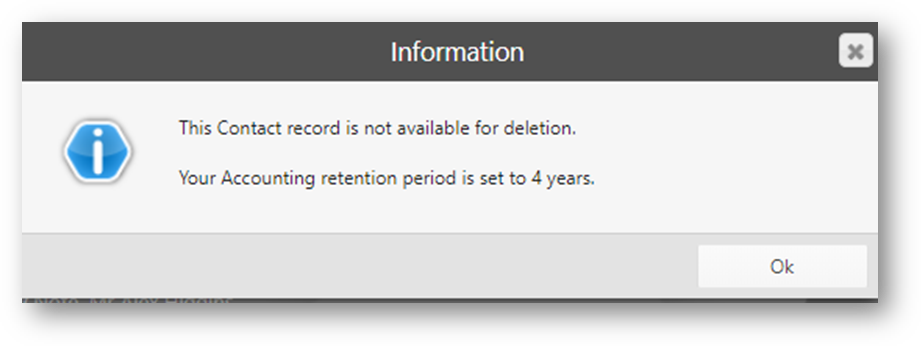
If you then click Ok, the screen will close and the contact won’t have been deleted.
You may want to feedback your decision to the person who requested their data to be removed.
For more information on this, click here.
If you refuse to delete the record, you may wish to change some settings on the Contacts record to ensure that you don’t contact them during the period you retain their data. You could:
- In the Contact top tab, remove their E-Mail address
- In the Preference Centre top tab, change all consent flags to Denied consent
- In the Contact and Position top tabs, change their Intention to Not Looking and their Position to Not Specified
- In Contact on the side menu, remove their Requirements Search Profile from matches
- In the Contact top tab or the Contact Notes top tab, add Contact Notes to indicate they requested a deletion but that this was refused
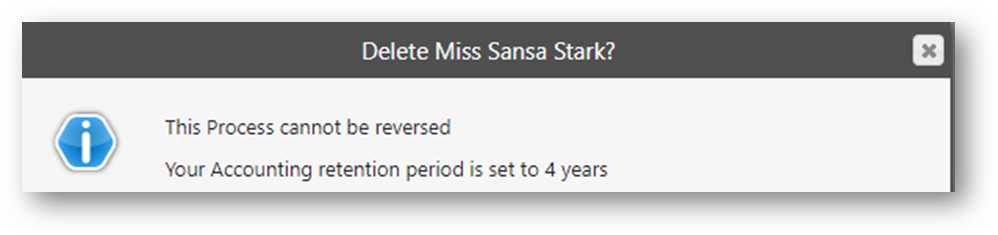
When the Accounting Retention Period setting is set to 0 but less than 7, a check will be made for accounting transactions but only for the number of years that you have set in the field. The warning message will display the value set:
Proceed to delete the contact record
- Click Proceed to delete the contact record
- A confirmation message appears in the top right of the screen stating Contact successfully deleted. The Contacts record will be deleted, and the Contacts Overview screen will be presented to you like this:
- All other tabs have been removed and therefore you will not be able to identify the person. You will not be able to use any of the action menus or buttons
- If you search for this person, they will not appear in any search results
If the person had made an offer on a property or had attended a viewing for example, you could still locate the record via the respective property, but the details would be anonymised to prevent the person involved being identified.
GDPR FAQs
Note
The content below is not legal advice. We have given answers to common questions based on what Alto will allow you to do. Please consult a legal advisor on your GDPR responsibilities.
Where possible, we have included links to government websites to assist you further
- "If a vendor or buyer told me to delete them and then in a year’s time they decide to complain about something, we won’t have a trail of anything to go to court with. I am concerned about this.”
- “What about AML records, how do I ensure I keep these?”
When you select the option to delete a contact, you will be presented with a message to remind you to consider retaining their data for regulatory or legislative purposes (e.g. the Ombudsman scheme).
To understand your client’s ‘right to be forgotten’, we recommend using the ICO’s website. This also has information about your right (as an estate agent) to refuse a client’s right to be forgotten, for example when you need to retain data for legal/regulatory requirements.
- "How long must we keep accounts data and what information in relation to the contact must we keep/not keep? If I hold Client accounting transactions that are less than 6 years old, how do I ensure that I keep the Client’s information in case the HMRC requests this from me?”
You can set an option called Accounting Retention Period. This will enable you to retain Contacts where you need information for the purposes of HMRC. The Accounting Retention Period is set in Tools (the cog) > Templates and admin > System Administration > Group Settings.
To understand your client’s ‘right to be forgotten’, we recommend using the ICO’s website.
- “If a Client asks for their data to be deleted, but they are involved in a current business transaction with me, what will happen to these transactions?"
When you are asked to delete an individual’s personal information, you can check if they have a pending or accepted offer, if they are a potential or current tenant, or if they are selling or renting a property with you. You would be advised to action changes in relation to this ongoing business because once you proceed with the deletion, you won’t be able to identify the applicant, or the vendor on the sale etc.
- “If I delete a contact, can I get them back?”
If you delete a record, it will not be retrievable.
- “What happens to documents that I store on a contact when the contact is deleted?”
Any attached documents (i.e. uploaded copies of a passport or a guarantor letter) will be permanently deleted from Alto. You will be responsible for deleting any versions held elsewhere.
If you have created documents within Alto that are stored on the Timeline, these will no longer be available to view.
-
Related Help Centre articles that you may find useful.